MetaMapper
Submit your content for our wall!
Browser-based polygon editor and generative animation tool for projection mapping.
MetaMapper lets you trace projection surfaces over a reference mask image, assign animated fill and edge effects to each region, modulate parameters with LFOs or live audio, and record the output — all from a single HTML file with zero dependencies.
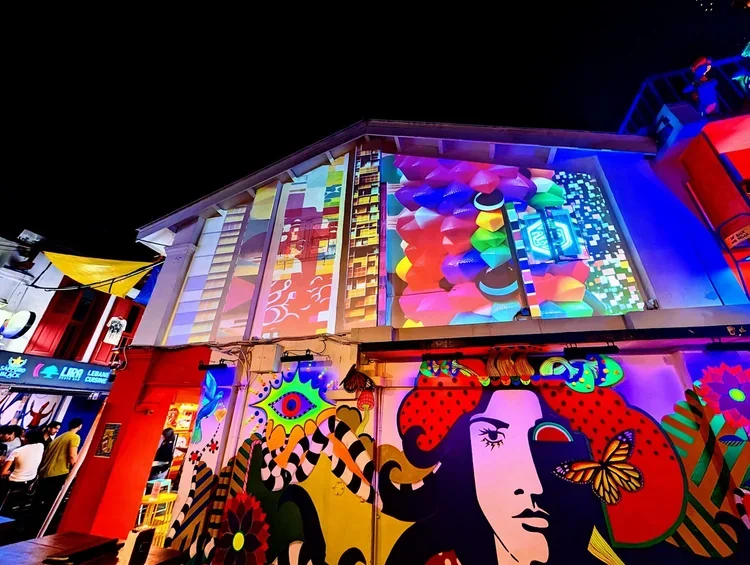
Developed by Metamo Industries as part of The Bridge Gallery (TBG) — a permanent projection mapping installation and creative exhibition space at 23 Haji Lane, Singapore.
Ver 1.7 now has the ability to load looping video files into each region and modulate their look.
Ver 1.6 now features the ability to load images to the different regions to make your animations even more of your own.
Live Demo
No installation required. Works in Chrome, Edge, and other Chromium-based browsers.
Features
Polygon Editor
Trace regions over a loaded mask/reference image
Vertex dragging, undo, reopen closed shapes
Layer reordering, duplicate, solo/mute per region
Open-path spline tool for text paths and standalone edge effects
Fill Effects
Noise, Scan Lines, Pulse, Breathe, Digital Rain, Static, Plasma, Gradient Sweep, Animated Grid, Ripple, and Stripes — each with per-region controls for hue, intensity, speed, scale, and angle.
Edge Effects
Chasing Pulse, Particle Flow, Strobe, Maze, Neon Glow, and Animated Dashes — with independent hue, speed, and width controls.
Text
Text input per region or spline
Three modes: Center, Follow Edge (text orbits the polygon/spline perimeter), Scroll (marquee)
Font selection, size, speed, and perpendicular offset from the path
Overlap detection at sharp corners
LFO & Audio Reactivity
Every parameter (fill hue, edge speed, opacity, scale, angle, etc.) can be modulated by:
Waveforms: Sine, Triangle, Sawtooth, Square, Noise
Live audio: Bass, Mid, and High frequency bands via microphone input
Post-Processing
Trails — motion echo/ghosting (adjustable persistence)
Bloom — gaussian glow with additive blending
Vignette — radial edge darkening
Chromatic Aberration — RGB channel offset
All post-FX have their own LFO/audio modulation
Global Controls
Speed, brightness, blackout (master fade)
Hue shift, saturation, contrast
Four-colour palette
Render resolution toggle (½× for performance, 1× for recording)
Recording & Export
MP4 video recording directly from the canvas
PNG screenshot capture
JSON project save/load (regions, effects, palette, all settings)
SVG vector export of traced regions
OBJ 3D mesh export with canvas-bounds reference quad
Blender Python script for orthographic camera setup matching your canvas dimensions
Presets saved to browser localStorage
Blend Modes
Per-region compositing: Normal, Add, Multiply, Screen, Overlay, Difference.
Randomize
One-click randomization of all region effects, with auto-randomize at configurable intervals (2–32 seconds).
Quick Start
Open MetaMapper in Chrome
Click Mask to load your projection mask template as a reference background
Click on the canvas to place polygon vertices over the mask
Click Close when your shape has 3+ points
Click + Region to start tracing the next panel — repeat for all surfaces
Toggle EDIT → ANIMATE to see your effects live
Click Unmask to drop the reference image for better performance
Use ⏺ to record MP4 or 📷 for PNG stills
Splines
Click + Spline to create an open path for text or standalone edge effects. Place points along the path, then click Close when done placing (the path stays geometrically open).
Sharing Projects
JSON ↓ downloads your complete project as a .json file
JSON ↑ loads a previously exported project file
Share the .json alongside MetaMapper for full project transfer
Using with Projection Mapping Software
SignCloud / Media Server Playback
Record your animations as MP4 at 1× resolution, then upload to your media server for playback. The canvas matches your projector's native resolution when a mask is loaded.
Resolume / VJ Software
Use OBS with the Spout2 Plugin to window-capture the fullscreen canvas and output as a Spout source that Resolume picks up natively.
Blender
Export OBJ + Blender .py setup script. Import the OBJ into Blender, run the Python script to create a pixel-aligned orthographic camera, then extrude and light your panel geometry in 3D.
TouchDesigner
Load the exported OBJ into a File In SOP. Set up a Camera COMP with orthographic projection matching your canvas dimensions.
After Effects
Record MP4 directly from MetaMapper and import into AE for compositing with other content.
The Bridge Gallery
MetaMapper was created as part of The Bridge Gallery (TBG) — a permanent projection mapping hub at 23 Haji Lane, Singapore. TBG serves as both a living canvas for projection art in the heart of Kampong Glam and a platform for opening up access to projection mapping tools and workflows to a wider creative community.
We are building toward an Open Call for submissions — inviting artists to create projection mapping content for the Haji Lane facade using MetaMapper and related tools. Stay tuned via @metamo_industries and @thebridgegallery.sg for announcements.
Technical Notes
Single self-contained HTML file — no build step, no dependencies, no server required
All rendering via Canvas 2D API
Audio reactivity via Web Audio API (microphone input)
Recording via MediaRecorder API (MP4 in Chrome, WebM fallback)
Polygon coordinates stored as normalized 0–1 values — resolution-independent
Presets persist in browser localStorage
Credits
MetaMapper by Metamo Industries Pte. Ltd.
Metamo Industries is a Singapore-based immersive media studio specialising in projection mapping, interactive installations, XR, and real-time engine work.
Website: metamoind.com
Instagram: @metamo_industries
The Bridge Gallery: @thebridgegallery.sg
License
© Metamo Industries Pte. Ltd. All rights reserved.